What Is a Design System? Unlocking SaaS Product Consistency

Most American SaaS companies discover that a single inconsistent button or menu can hurt user trust and efficiency. Building a unified experience becomes critical as products scale, and the gaps only widen without a structure in place. A well-crafted design system offers more than neat visuals—it streamlines teamwork and delivers the kind of seamless user journeys that set top products apart. Learn how a deliberate approach transforms the way American teams and users connect with digital platforms.
Table of Contents
- Defining Design Systems in SaaS Context
- Core Components and Architecture Explained
- Types of Design Systems and Their Distinctions
- Practical Benefits for SaaS Teams and Users
- Challenges, Pitfalls, and How to Avoid Them
Key Takeaways
| Point | Details |
|---|---|
| Design Systems Ensure Consistency | A well-defined design system provides reusable components and guidelines, creating a uniform user experience across products. |
| Accelerated Development Process | Centralizing design resources helps SaaS teams to streamline workflows and decrease redundant work, leading to faster product iterations. |
| Scalability and Flexibility | Design systems can be tailored to specific needs, allowing companies to evolve their systems as the complexity and requirements of the product grow. |
| Enhanced User Satisfaction | Predictable and intuitive interactions facilitated by design systems contribute to higher user engagement and satisfaction. |
Defining Design Systems in SaaS Context
A design system represents a comprehensive software framework that brings structure and predictability to digital product development. At its core, a design system is a centralized package of reusable UI components, guidelines, and design standards that enables SaaS teams to create consistent, scalable digital experiences across their entire product ecosystem.
Think of a design system like an architectural blueprint for your digital product. Just as architects use standardized building materials and precise specifications to ensure structural integrity, design systems provide SaaS companies with a systematic approach to creating interfaces. These systems encompass everything from color palettes and typography to complex UI components and interaction patterns, ensuring every screen and feature looks and feels like a cohesive part of the same product.
The primary goal of a design system is to eliminate inconsistencies and reduce redundant design work. By establishing a centralized, version-controlled framework of essential components, product teams can dramatically accelerate their development process. Designers and engineers can quickly reference established guidelines, reuse pre-approved components, and maintain visual harmony across web and mobile platforms. This approach not only saves time but also creates a more intuitive and professional user experience.

Pro Tip for Design System Success: Start small by documenting your most frequently used UI components and gradually expand your system. Focus first on creating clear, flexible guidelines that can evolve with your product’s growth and complexity.
Core Components and Architecture Explained
A robust design system is built on several fundamental architectural components that work together to create a cohesive and scalable digital product infrastructure. Component-based software engineering principles emphasize creating modular, reusable elements that can be easily integrated and maintained across different parts of a digital product.
The core architecture of a design system typically includes several key elements:
- Design Tokens: Fundamental visual design attributes like colors, typography, spacing, and animation properties
- UI Component Library: Reusable interface elements such as buttons, form fields, navigation components, and complex interactive modules
- Style Guidelines: Comprehensive documentation detailing how components should be used, including visual specifications and interaction patterns
- Implementation Standards: Technical guidelines for developers on how to implement and extend design system components
These components create a powerful ecosystem that enables design and development teams to work with unprecedented efficiency. By establishing a standardized approach to software construction, design systems transform how SaaS products are built, ensuring consistency and reducing redundant work across teams and product iterations.
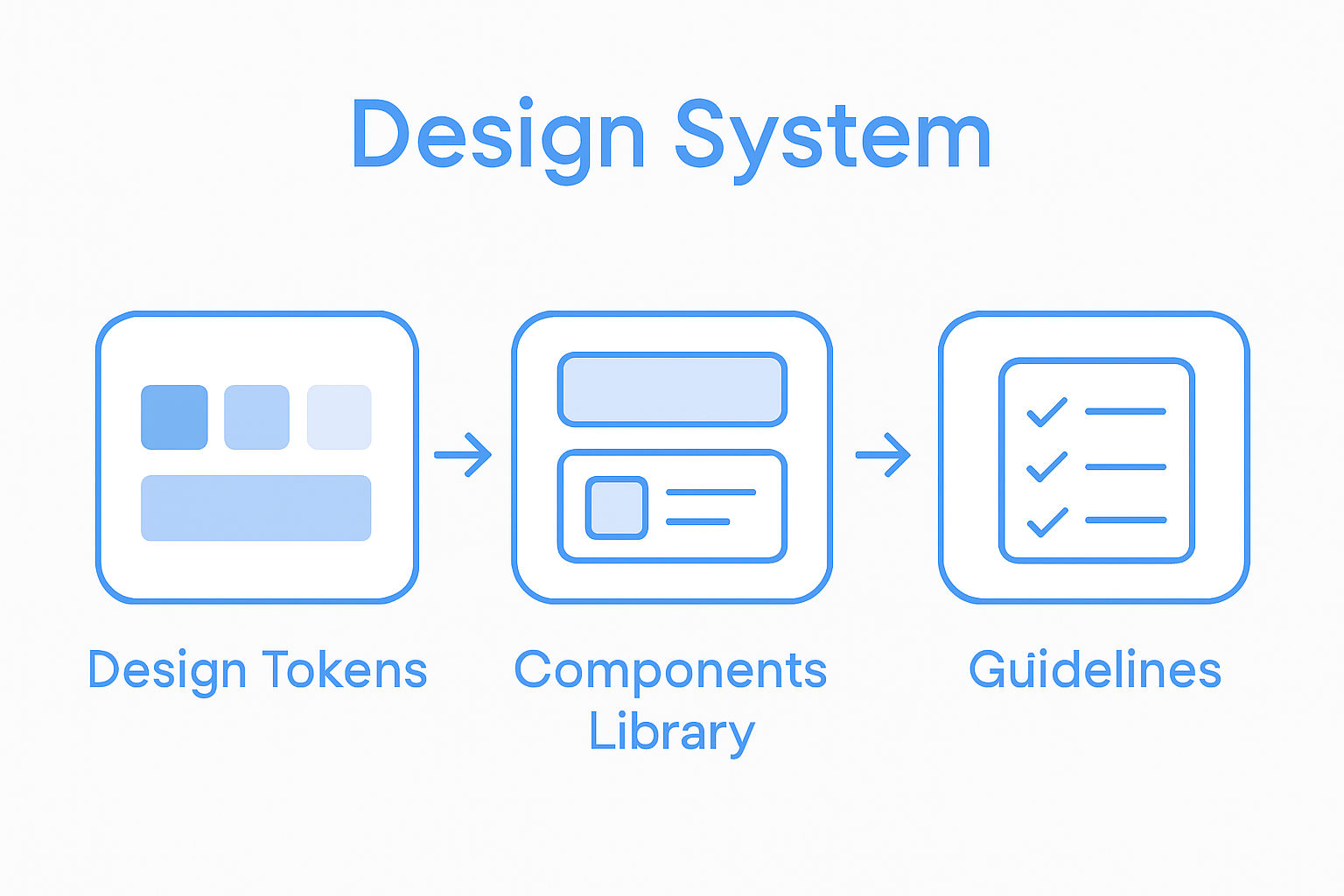
Pro Tip for Component Design: Create a living document that tracks your design system’s components, allowing for continuous refinement and adaptation as your product evolves. Regularly review and update your components to maintain relevance and effectiveness.
Here’s a summary of core design system components and their roles:
| Component | Purpose | Business Impact |
|---|---|---|
| Design Tokens | Define visual styles like color and spacing | Simplifies brand updates |
| UI Component Library | Collection of reusable UI elements | Accelerates feature rollout |
| Style Guidelines | Documentation for consistency | Ensures uniform user experiences |
| Implementation Standards | Coding best practices for components | Reduces tech debt and rework |
Types of Design Systems and Their Distinctions
Design systems are not one-size-fits-all solutions, but rather dynamic frameworks that can be tailored to meet specific organizational needs. Notable design systems demonstrate remarkable diversity, ranging from simple style guides to comprehensive digital ecosystems, each with unique characteristics and implementation strategies.
Some prominent examples illustrate the spectrum of design system complexity:
- Minimal Design Systems: Lightweight frameworks focused on basic visual consistency
- Comprehensive Design Systems: Extensive libraries with detailed documentation, coded components, and governance models
- Platform-Specific Design Systems: Tailored solutions like industry-leading frameworks from major tech companies, including:
- Lightning Design System (Salesforce)
- Material Design (Google)
- Carbon Design System (IBM)
- Fluent Design System (Microsoft)
The maturity and sophistication of a design system typically evolve with an organization’s design and development practices. Smaller startups might begin with a basic style guide, while larger enterprises develop intricate systems that serve as comprehensive product development frameworks. The key is creating a system flexible enough to grow alongside your product’s complexity while maintaining core principles of consistency and efficiency.
Pro Tip for Design System Evolution: Start with a minimally viable design system and incrementally expand its scope. Document your components, gather team feedback, and continuously refine your approach to match your product’s unique requirements.
Compare common types of design systems in SaaS environments:
| System Type | Complexity Level | Best Fit For | Example Platform |
|---|---|---|---|
| Minimal | Low | Early-stage startups | Simple style guides |
| Comprehensive | High | Large, mature organizations | Salesforce Lightning |
| Platform-Specific | Moderate to High | Teams with unique platforms | Google Material |
Practical Benefits for SaaS Teams and Users
Design systems transform how SaaS teams develop and users experience digital products by creating a structured approach to product development. Case studies demonstrate how implementing a design system can dramatically improve platform consistency and collaboration, delivering tangible benefits across multiple organizational dimensions.
For development teams, design systems offer profound operational advantages:
- Accelerated Development: Reusable components reduce redundant design and coding work
- Consistent User Experience: Standardized interface elements create intuitive product interactions
- Faster Onboarding: New team members can quickly understand design and development standards
- Reduced Technical Debt: Centralized design guidelines minimize inconsistent implementations
Users also experience significant improvements through design systems. A well-crafted system creates predictable, seamless interactions that feel natural and intuitive. When interface elements behave consistently across different product sections, users spend less mental energy understanding how to navigate and use the software. This reduced cognitive load translates directly into higher user satisfaction, increased engagement, and ultimately improved product adoption rates.
Pro Tip for Design System Implementation: Document your design system comprehensively, but keep it flexible. Create clear guidelines that provide structure while allowing room for innovation and adaptation as your product evolves.
Challenges, Pitfalls, and How to Avoid Them
Designing and implementing a successful design system is rarely straightforward. Organizations frequently encounter significant challenges when creating a unified approach to product design and development, requiring strategic planning and continuous adaptation.
Key challenges in design system development include:
- Team Misalignment: Different departments having conflicting design perspectives
- Scalability Issues: Creating components that work across multiple platforms and contexts
- Maintenance Overhead: Keeping the system updated and relevant
- Adoption Resistance: Overcoming team members’ reluctance to change existing workflows
- Complexity Management: Balancing flexibility with standardization
Successful design systems emerge from creating a single source of truth that improves consistency and collaboration, addressing UI inconsistencies and inefficient workflows. This requires more than just creating a set of design rules. Teams must develop a living, breathing framework that can adapt to changing product needs while maintaining core design principles. Effective implementation involves continuous communication, regular system audits, and a culture of shared design responsibility.
Pro Tip for Overcoming Challenges: Create a cross-functional design system team with representatives from design, engineering, and product management. Establish clear governance processes and regular review cycles to ensure ongoing relevance and buy-in from all stakeholders.
Unlock Seamless SaaS Product Consistency with Expert Design Systems Support
Struggling with fragmented user interfaces or inconsistent digital experiences in your SaaS product The challenge of building and maintaining a scalable design system that aligns design tokens UI components and style guidelines can feel overwhelming. The complex process of uniting teams overcoming adoption resistance and keeping your design system evolving requires skilled partners who understand these pain points and deliver real results.
At The Good Side we specialize in transforming scattered SaaS product designs into cohesive, high-performing ecosystems. Our senior designers bring deep expertise in strategic UI/UX design and end-to-end user journey optimization tailored for SaaS environments. From creating living design systems to reducing technical debt and accelerating development cycles, we help your team save time and elevate user satisfaction through consistent, intuitive experiences.
Start your journey today with a free design audit and experience how partnering with SaaS-focused experts can unlock stronger brand consistency and drive revenue growth. Visit us now at The Good Side and explore how our flexible engagement models empower your team to build future-ready design systems that scale with your business.
Frequently Asked Questions
What is a design system in SaaS?
A design system in SaaS is a centralized package of reusable UI components, guidelines, and design standards that help teams create consistent and scalable digital experiences across their products.
Why is having a design system important for SaaS teams?
A design system eliminates inconsistencies and reduces redundant design work, allowing teams to speed up development processes, maintain visual harmony, and create a more intuitive user experience.
What are the core components of a design system?
Core components of a design system include design tokens (visual attributes), a UI component library (reusable elements), style guidelines (documentation), and implementation standards (coding best practices).
How do companies evolve their design systems?
Companies typically start with a minimally viable design system focused on essential components and incrementally expand it based on feedback, product evolution, and changing requirements.